Instructions for coordinators
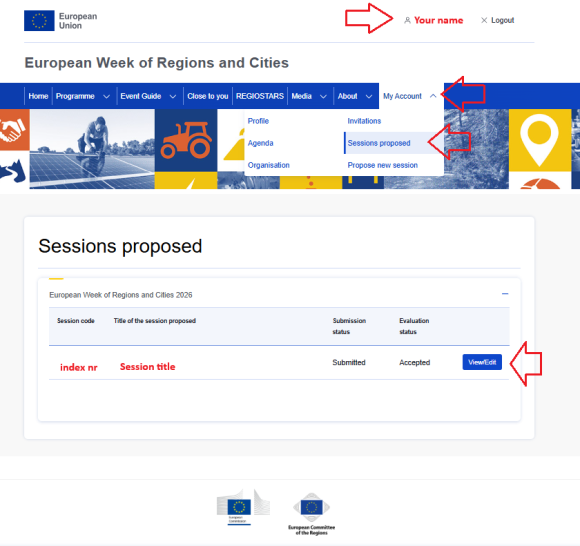
- Log in to your account
- Go to My Account > Session Proposed
- Click on View/edit session blue button next to session title
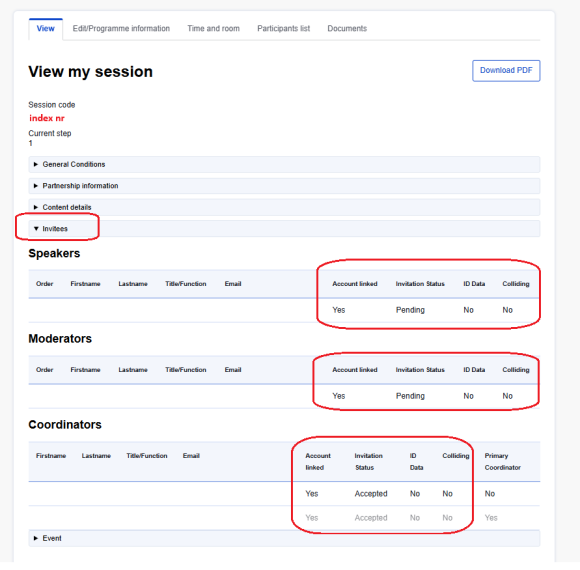
In the VIEW tab go to INVITEES sub section and please verify the following information:
- ACCOUNT LINKED – if all invitees (speakers, moderators and coordinators) have an account on the platform
- INVITATION STATUS – check if PENDING or ACCEPTED. If PENDING – please reach out to your invitees making sure they accept as soon as possible and before the deadline of 30 September. Instructions for speakers on how to accept the invitation are published in the event guide.
- ID DATA – is required for onsite attendance of the event. For security reasons, badges will only be granted to profiles with a valid ID/Passport number and related personal data. Make sure all your invitees have their ID DATA filled in.
- COLLIDING – if YES, means the invitee is registered to two sessions happening at the same day and time. Please contact the speaker and secretariat to solve the issue.
How to fill in your ID data
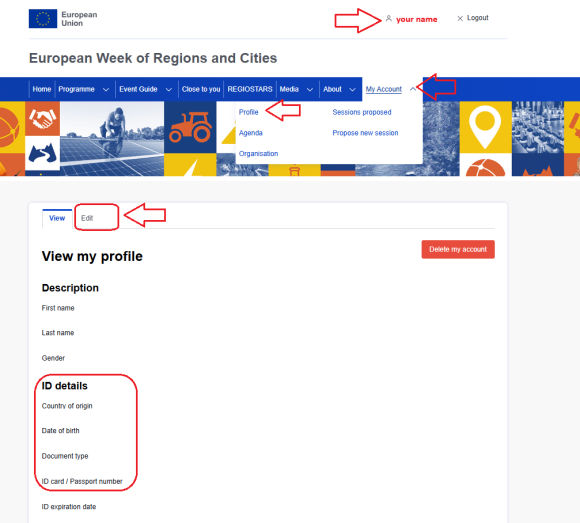
- Log in to the platform
- Go to My Account > Profile
- Go to EDIT tab
- Fill in ID details required:
- Country of origin
- Date of birth
- Document type
- ID card / Passport number
- ID expiration date
- Date of issue