You can upload documents relating to your session directly from the platform.
Log in to the EURegionsWeek platform using EU Login.
Open your session settings (“Edit my session”).
Click on the Documents tab.
You will see two upload sections:
Public documents — displayed on your session’s page and visible to all. Use this for materials you want participants to see (e.g. programme, general presentation).
Private documents — not displayed on your session’s page; visible only to organisers and, where relevant, interpreters. Use this for interpretation materials (speeches, speaking notes, detailed presentations) that should not be shown publicly.
Click on “Choose files” to choose your file(s), then click Upload.
Click Submit to save.
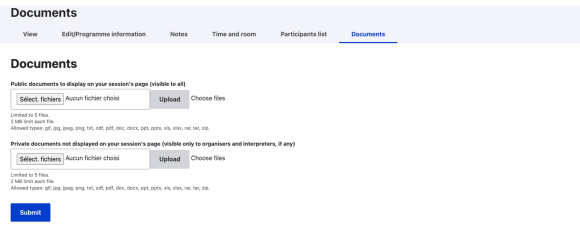
File limits: maximum 5 files per section, 2 MB per file. Allowed formats: gif, jpg, jpeg, png, txt, odf, pdf, doc, docx, ppt, pptx, xls, xlsx, rar, tar, zip.
Note: if your session has interpretation, please upload any speech, speaking notes or presentation your interpreters will need under Private documents, so they remain accessible to interpreters without being publicly visible on your session page.